Video Library Platform
A multi-client platform that delivers a personalised video viewbook to prospective students, built from the Suffolk University reference site, offered in three layout templates, and managed through an admin tool. Built specifically for StudentBridge, who onboard and manage university clients; owned and operated by imedia8 on its ContentHub video platform.
tenant.schema.json, tenants/suffolk.json, template mock-upsContents
- Purpose and scope
- Glossary
- Product overview
- System architecture
- Tenant configuration
- Templates, themes, card styles and custom themes
- Section catalogue
- Features and behaviour
- Responsive behaviour
- Visitor accounts and state
- Analytics
- Admin tool
- Non-functional requirements
- Delivery plan and acceptance
- Decision log
- Appendix A: tenant file summary
- Appendix B: template mock-ups
- Appendix C: campus map mock-ups
- Appendix D: reference builds and prototypes
1. Purpose and scope
StudentBridge produces admissions video for universities. Their Suffolk University Video Library proved a product: a branded site where prospective students browse that video, personalise it by interest, follow a campus tour, save favourites and reach Apply, Visit and Request Info in one tap. This specification describes the platform imedia8 will build and license to StudentBridge so that product can be launched for many clients from one codebase, with each client site looking distinct. imedia8 owns the platform and the ContentHub video infrastructure it runs on; StudentBridge operates it for their university clients. Throughout this document "we" means imedia8.
In scope for v1: the visitor-facing site (renderer) in three templates; the tenant configuration model; visitor accounts; analytics; the admin tool for us and for client admissions teams.
Also in scope: the interactive campus map as a page and a home-page section in every template, with its editor in the admin tool (section 8.13); and custom themes for clients who need a fully bespoke look, via export, developer edit and re-upload (section 6.7).
Out of scope for v1: AI chat (hook only), the swipeable vertical mobile feed, client-domain hosting, embeds in client sites, tiled street-map bases.
Technology choices (framework, hosting provider, database) are the lead developer's. This document fixes behaviour and the data contract between components.
2. Glossary
tenant.schema.json.3. Product overview
3.1 What a visitor gets
A branded site at {tenant}.university-tour.com (also {tenant}.college-tour.com) with a welcome video, a personalised feed of short student-made videos, category browsing and search, a guided campus tour with progress, and one-tap routes to Apply, Visit and Request Info. Everything works without an account; registering keeps saved videos and progress across devices.
3.2 What a client gets
A site in their colours, logo and typography, in the template they chose, with only the sections they want. An admin login where their team adds videos, edits copy, updates deadlines and FAQ, previews and publishes. If accounts are enabled, a view of registered visitors and their interests, exportable as CSV.
3.3 What StudentBridge gets
A licensed platform under their own name. New client onboarding is configuration, not development; their team creates tenants, sets templates and brand, and publishes. Feature improvements ship to every client at once. Analytics across all their tenants. The admin tool carries StudentBridge's branding for them and their clients.
3.4 What imedia8 gets
Ownership of the platform and the code, operated once on imedia8 infrastructure. ContentHub as the delivery layer for every site. Usage reporting (tenants, visits, video minutes) for the licence. Control of renderer, theme contract and schema versions.
4. System architecture
4.1 Components
?tenant=key&version=draft, platform-admin only.4.2 Hosting and routing
Two apex domains are ours: university-tour.com and college-tour.com. Each tenant is a subdomain on both; the renderer treats them as aliases and canonicalises to one (configurable per tenant) for SEO. Wildcard TLS on both apexes. No client-owned domains in v1.
4.4 Licensing model
imedia8 builds and owns the platform and operates it on its own infrastructure, including ContentHub. StudentBridge is the sole licensee; no other licensee is anticipated, so the platform is single-licensee by design: no licensee tier, no multi-licensee isolation, no per-licensee white-labelling. The admin tool is branded StudentBridge throughout, with a "Powered by imedia8 ContentHub" credit. Two things are kept simple but explicit for the licence: a usage report across all tenants (tenants live, visits, video minutes, registrations per month), and imedia8-only controls for renderer, schema and theme-contract versions. The code should not hard-code StudentBridge's name in markup; it reads from one platform-level config so a rebrand is a config change, not a reason to generalise to multi-licensee.
4.3 Media
All videos[].src and videos[].poster values are ContentHub URLs. The renderer never proxies or transcodes media. The admin tool's video editor should let an admin browse or paste ContentHub assets; it should not accept uploads to our own storage in v1. Logos and category cover images may be uploaded to platform storage.
5. Tenant configuration
Everything that varies per client lives in the tenant file. The renderer contains nothing client-specific. Full definition in tenant.schema.json; worked example in tenants/suffolk.json.
tenant, name, domain, domains, localetemplate, theme, cardStylebrandcopyinterests[]categories[]searchTags[]sections[]ctaCards[]tourhubctaschatfeaturesvideos[]mapcustomThemedemoState5.1 Validation
- Schema-valid against
tenant.schema.json. - Every
videos[].categorymatches acategories[].key. - Every video id referenced by
tour.stops,copy.hero.videoId,sections[].videoIdsanddemoStateexists. interests[].label≤ 14 characters; between 2 and 8 interests.- At least one video section (
recommended,popularorcustom-row) is enabled. - Brand contrast: accent on primary and ink on surface meet WCAG AA 4.5:1 for body text. Warn, don't block; platform admin signs off.
- All media URLs resolve (HEAD check at publish).
5.2 Brand as CSS variables
The Suffolk build contains 372 hard-coded hex values. The renderer maps brand to CSS custom properties once (--brand-primary, --brand-surface, --brand-accent, --brand-ink, --brand-font, --brand-heading-font, --radius-card, --radius-button) and derives every tint and shade with color-mix(). Tenants never store derived colours.
6. Templates, themes, card styles and custom themes
Three independent choices give each tenant a distinct structure. Mock-ups of the three templates on three demo brands are in reference/template_variations.dc.html. Cinema is the Suffolk layout as built; Editorial and Guide are new. All three expose the same features and read the same tenant file.
6.1 Template: Cinema
6.2 Template: Editorial
recommended renders as a mosaic: one featured card spanning two rows plus four small cards. Other rows render as card grids. Categories as a 5-up poster row with counts.6.3 Template: Guide
6.4 Themes
surfaceprimarysurface lightened 6%primary at 4%primary for headings and ink; accent for emphasisprimary at 6% over whiteprimaryprimary for headingsAny theme works with any template. Default pairings (Cinema–Dark, Editorial–Light, Guide–Tinted) are suggestions in the admin tool, not constraints.
6.5 Card styles
landscape 16:9 with title below; poster 3:4 with title over a bottom scrim; square 1:1 with category chip, save button and title over a scrim. Applies to every video section. Category cards are always 3:4 unless the card style is square. Grid column counts adjust so cards stay between 220px and 340px wide.
6.6 Brand
Colours: primary, surface, accent, accentHover, ink. Fonts: font (body and UI) and optional headingFont; Google Fonts, self-hosted or system. Logo: reversed (for dark chrome) and dark (for light chrome) variants, SVG preferred. Radii: card and button. The combination of template × theme × card style × brand is what makes two client sites read as different products.
6.7 Custom themes (developer mode)
Some clients will want a look that no template, theme or brand setting reaches. For them the platform supports a custom theme: the client's developers export the renderer's presentation layer, modify it, and upload it back. The admin tool keeps working for text, videos, map places and every other content edit, because content and presentation are separated by a fixed contract.
What is exported. A theme package (zip) generated from the tenant's current template and theme: one layout file per page type (home, watch, explore, search, campus), one partial per section type and per shared component (header, footer, HUB, card, player, map directory, place detail, tour dock…), the stylesheet with brand variables already resolved, static assets, a theme.json manifest, and a copy of the tenant file plus a fixtures folder so the package previews offline.
The contract. Layouts and partials are HTML with a small, documented binding syntax: content slots ({ { copy.hero.headline } }, { { video.title } }), loops over tenant data ({ {#each sections} }), conditionals on feature flags, and data-sb-* hook attributes that the shared JavaScript binds behaviour to (data-sb-player, data-sb-chip, data-sb-map, data-sb-hub-toggle…). Developers may change any markup, class, style and asset. They may not remove required hooks or bindings, add server code, or load scripts from origins outside an allow-list. The shared JavaScript (player, PiP, search, personalisation, HUB, map engine, analytics) is not part of the package; it is loaded by the renderer and versioned by us.
Import and validation. Upload replaces the tenant's draft theme. The validator checks: manifest present and compatible with the current renderer version; every required binding and hook present per page type; no disallowed script origins; no inline event handlers; HTML parses; CSS has no @import from unknown origins; package under a size limit. Warnings for accessibility regressions (contrast, missing alt bindings). The validated theme previews through the real renderer before publish, like any other change. Versions, diff against the generated baseline, and rollback as for tenant files.
Upgrades. When the renderer or shared JavaScript changes, templates and themes we own update automatically. Custom themes are pinned to the contract version they were built against; we maintain backward compatibility for hooks within a major version and give notice before a breaking change. The admin tool shows "theme contract v1.x; renderer v1.y" and flags when a re-export is recommended. Content edits never require touching the theme.
In the tenant file. theme: "custom" and a customTheme block: package id, contract version, uploaded-by, uploaded-at, baseline template and theme it was exported from. Switching back to a standard theme is one click and keeps the custom package in history.
7. Section catalogue
The home page below the hero is exactly sections[], rendered in order. Each entry has a type, optional title, subtitle, icon and limit, and can be removed entirely. The hero, header and footer are always present.
recommendedfeaturedIn: recommendedcontinuepopularfeaturedIn: mostviewedcategoriescategories[]custom-rowvideoIdscta-cardsctaCards[]bannercopy.bannerhub-bandcampus-mapmap (when enabled)newslettercopy.newsletterInterest matching: a video matches if any keyword of any active interest appears, case-insensitively, in its title, category, tags or description. Watched videos render desaturated 60% and 82% opacity until hovered. The Suffolk build pads Continue with fake progress when filtered; the platform does not.
8. Features and behaviour
Behaviour is common to all templates unless noted. Pixel values are in the reference build and the template mock-ups.
8.1 Hero
Headline, optional accent emphasis line, body, primary play action opening copy.hero.videoId. Cinema autoplays a muted loop of copy.hero.backgroundVideo (respecting prefers-reduced-motion); Editorial and Guide use the hero video's poster. Secondary action (Editorial, Guide) starts the campus tour.
8.2 Make It Yours
Chips from interests[]; toggling re-renders all video sections and shows a toast; Reset clears. State persists per visitor. Cinema: glass card in the hero, collapsible to a pill; on desktop with a fine pointer, the header is a drag handle that lifts the card to a fixed floating position (clamped to viewport, below the header), remembers the position, docks back on minimise, resets on double-click. Editorial: inline chip row. Guide: modal from the "Personalise my guide" button; active interests echoed in the Recommended heading.
8.3 Video cards
Poster, duration pill, optional label badge (label.text, label.color or accent), save and like buttons, progress bar when progress exists. Hover: scale 1.15 with glow, play overlay, muted preview if a preview clip exists — all gated to (hover: hover) and (pointer: fine). Tap opens the player.
8.4 Player
Route /watch/{videoId} so videos can be shared. 16:9 video with native controls, captions from WebVTT when present. Meta card: tags, title, category · duration · published, description, student quote, like, save, "More in this category". Transcript toggle swaps the description for clickable transcript lines that seek the video; copy-transcript button. Related row: same category first, then catalogue order. Resumes from saved progress; writes progress at 25/50/75/100%.
8.5 Picture-in-picture
When the player's bottom edge scrolls above the header, the video floats to bottom-left (270–380px wide, accent border, mini header with title and close). Closing suppresses PiP until the visitor scrolls back to the top. Bottom offset 84px on mobile to clear the tab bar. Flag features.pip.
8.6 Search
Full-screen overlay (Cinema, Guide) or inline results page (Editorial). Text query matches title, tags, description, category. Tag pills from searchTags[] filter by tag or category. Count badge. Empty query shows the whole catalogue under copy.search.heading.
8.7 Category view
Full-screen: cover, name, blurb, "Watch first" for the first video, count, then every video in the category. Route /explore/{categoryKey}.
8.8 StudentHUB
Contents in order: account card (sign-in prompt when anonymous; name and avatar when signed in), quick actions from hub.quickActions, Continue watching, Saved with count, Tour progress (completed / total, next stop, Continue), FAQ and Key dates buttons. Placement by template (section 6). FAQ and Key dates open as modals from hub.faq and hub.keyDates, each with a footer CTA. Escape closes any modal and, on mobile, the drawer.
8.9 Campus tour
tour.stops is an ordered list of video ids. A stop is complete when its video reaches 90%. Progress = completed / total. "Continue" opens the first incomplete stop. Guide shows progress as a ring in the sidebar; Cinema and Editorial as a bar. Completing the last stop shows a completion state with the Apply and Visit CTAs.
8.10 Chat assistant
Floating button bottom-right, hidden while the HUB drawer or PiP would overlap it on small screens. Panel with persona header, message list, input. scripted mode: first rule whose any match substring appears in the lower-cased query wins, else the fallback, after a 400ms delay. llm mode: POST to the platform endpoint; out of scope for v1 beyond the hook. Flag features.chat.
8.11 Calls to action
apply, visit, requestInfo resolve to ctas.*.url, open in a new tab by default, and fire cta_click with their source before navigating. They appear in the header or sidebar, the bottom tab bar, the HUB, the CTA cards, the FAQ and Key dates footers, and the tour completion state.
8.13 Interactive campus map
Optional per tenant (features.campusMap, map.enabled). A full page at /campus plus an optional campus-map teaser section on the home page. Reference: the Suffolk Campus Discovery build; mock-ups for all three templates in reference/template_variations.dc.html (2a, 2b, 2c).
Map artwork. The map image is produced externally (illustrator or aerial render) and uploaded as a JPG, PNG or other bitmap. The admin tool reads its pixel dimensions on upload; those become the coordinate space for every pin, so no geographic data is needed. Recommended 3000–6000px on the long edge, under 8 MB; the platform generates the zoom tiles or resized variants it needs. Replacing the artwork with a new version at the same aspect ratio keeps pins in place; a different aspect ratio prompts the admin to re-check positions.
Map engine. A pan-and-zoom image map (Leaflet with a simple pixel coordinate system in the reference) over that artwork. Zoom is constrained so the image always fills the viewport; initial centre and zoom are configurable. A tiled street-map base is a later option for clients without artwork.
Pin styles. The platform admin chooses a pin style per tenant from a fixed set: shape (round, teardrop, square, hexagon), size (small, medium, large), fill (brand accent, brand primary, per-category colour, or a custom colour per category), glyph (none, category icon, number when on a tour) and label (always, on hover, never). Tour pins are always numbered and get a tick when visited; the selected pin is highlighted with a halo in the accent colour. A pin style preview sits beside the controls. Pin styles live in map.pinStyle.
Places (POIs). Each has id, name, subtitle, category, pixel position, icon, hero image, video (ContentHub), description, optional transcript, hours, address or size, services, highlights, photo gallery and 360° panorama. Pins are dimmed by the category filter; labels follow the pin style.
Pin reveal (place detail). Tapping a pin opens the reveal. Its layout follows the Suffolk Campus Discovery expanded view: a top bar with the category badge on the left and a media switcher on the right (Video Tour · 360° Walk · Gallery, plus Tour Dock and Close); below, a two-column body. Left (about 65%): the media stage, a 16:9 player with custom controls (play/pause, mute, time, scrub bar, quality badge) and a Transcript toggle in its top-left corner. Right: title, subtitle in accent, Overview with a "Show transcript" link, two fact tiles (e.g. Standard hours, Facility size or address), Key facilities and features as an icon list, a Programs and resources card, and a pinned footer with Like · Share · Save and Visit · Request · Apply. Only tabs with content appear: a place with no video opens on Gallery (photos as a swipeable set with captions) and the Video Tour tab is hidden; a place with no panorama hides 360° Walk. Cinema renders the reveal as the expanded tour dock; Editorial as a side card that expands to this layout on "Expand"; Guide as a bottom sheet that expands the same way. On mobile the reveal is a full-screen sheet with the media stage on top and the detail column below.
Directory. Categories (up to 6) with colour, icon and short label; an accordion list of places with search and category filter pills. Cinema: left drawer, 320px. Editorial: filter pills over the map and a directory grid below. Guide: category tab bar; the sidebar lists the current tour.
Place detail. Media tabs Video · Photos · 360° · Transcript; name, category label, hours, address, description, highlights; save; Next stop when a tour is active. Cinema: a bottom dock that expands to a two-column panel. Editorial: a side card beside the map. Guide: a bottom sheet. Mobile, all templates: full-screen bottom sheet.
Curated tour. map.curatedTour.stops is an ordered list of place ids. Starting it numbers the pins, draws the animated route line, and opens stop 1. Progress is shared with the StudentHUB tour (section 8.9); the HUB's "tour" and the map's curated tour are the same object when the map is enabled, so the tenant file carries one list.
Smart Path. A generated tour from a duration (30 / 45 / 60 minutes) and category preferences, using the per-place video length plus walking time between consecutive places from map.smartPath.distances. The admin tool can estimate walking times from pixel distance and a metres-per-pixel scale; admins can override any pair. The result behaves exactly like a curated tour.
Cross-links. A place may reference a catalogue video (videoId) so watching from the map counts in Continue Watching; a catalogue video may carry a placeId so the player offers "Find on map". Analytics: map_open, place_select, tour_start, tour_stop_complete (shared), smart_path_generate.
8.12 Newsletter, footer, toasts
Newsletter: single email field, posts to the platform, success toast from copy.newsletter.success. Footer: link columns from copy.footer plus a StudentBridge credit. Toasts: bottom-centre pill, 2.8 seconds, used for feedback only, never for navigation placeholders.
9. Responsive behaviour
10. Visitor accounts and state
features.signIn is none, optional (default) or required. Accounts are standalone on our platform: email and password, magic-link reset, optional Google and Apple sign-in later. No SSO, no connection to any client system. An account is scoped to the tenant it registered on.
10.1 Anonymous state
Kept in the browser, namespaced by tenant: interests, saved, liked, progress per video, tour completion, UI preferences (Make It Yours expanded/collapsed and position, HUB open), and an anonymous visitor id for analytics continuity. Every feature works in this state. The HUB shows a sign-in prompt in place of the account card.
10.2 Signed-in state
On first sign-in the browser state merges into the account (union for lists, maximum for progress) and the browser copy becomes a cache. Progress follows the visitor across devices. The client's admins see the visitor in the admin tool: name, email, registered date, interests, saved count, tour completion, last visit; exportable as CSV. Visitors can delete their account from the HUB.
10.3 Privacy
Visitors may be under 18. Collect the minimum: name, email, password. Age confirmation (13+) at registration. Privacy notice and terms linked from registration and footer, hosted by us with a per-tenant data-sharing statement (the client receives lead data). Consent for analytics cookies where required by the visitor's jurisdiction. Data retention: anonymous state indefinitely in-browser; accounts until deleted; analytics 25 months.
11. Analytics
Every event carries tenant, visitor id, session id, timestamp, device class and template. Minimum event set:
page_viewvideo_start / video_progress / video_completeinterest_togglesave / likesearchcta_clickhub_open / hub_closetour_stop_completechat_messageregister / sign_incta_click is the conversion event and must fire before navigation. Reporting in the admin tool: visits, unique visitors, videos started and completed, top videos, interest selections, CTA clicks by source, registrations; filterable by date range; per tenant for clients, cross-tenant for platform admins.
12. Admin tool
A web application for three roles. Platform admins (imedia8) have everything below plus renderer, schema and theme-contract versions, the usage report and support access. StudentBridge admins see every tenant, create tenants, set identity, domains and feature flags, upload custom themes, and can impersonate a client admin for support. Client admins see their tenant only and edit everything except identity, domains and feature flags. The tool is branded StudentBridge (4.4). Mock-ups in Admin UI.dc.html; the screen list below is the scope.
Every edit writes to the draft. Nothing reaches visitors until Publish. The preview renders the draft through the real renderer so what admins see is what visitors will get.
13. Non-functional requirements
14. Delivery plan and acceptance
14.1 Deliberate departures from the Suffolk build
- Four full-height mobile tabs instead of a two-row grid of 28px buttons.
- Make It Yours collapsed by default on mobile.
- No fabricated Continue progress when filtered.
- Hover effects gated to hover-capable devices.
- Chat button hidden where it would overlap the drawer or PiP.
- CTAs navigate to real URLs rather than showing a toast.
- No hard-coded signed-in user; a real anonymous state.
- 13px type floor on mobile.
- Label colours as values, not Tailwind class strings.
- Player and category views as routes.
15. Decision log
university-tour.com and college-tour.com. No client domains or embeds in v1.16. Appendix A: tenant file summary
Full schema: tenant.schema.json. Worked example with Suffolk's 22 videos and 14 map places: tenants/suffolk.json.
17. Appendix B: template mock-ups
Desktop home page at 1440px for each template, each on a different demo brand to show that layout, theme and brand vary independently. Cinema uses Suffolk's real content; Editorial and Guide use demo content. Interactive source: reference/template_variations.dc.html (1a, 1b, 1c).
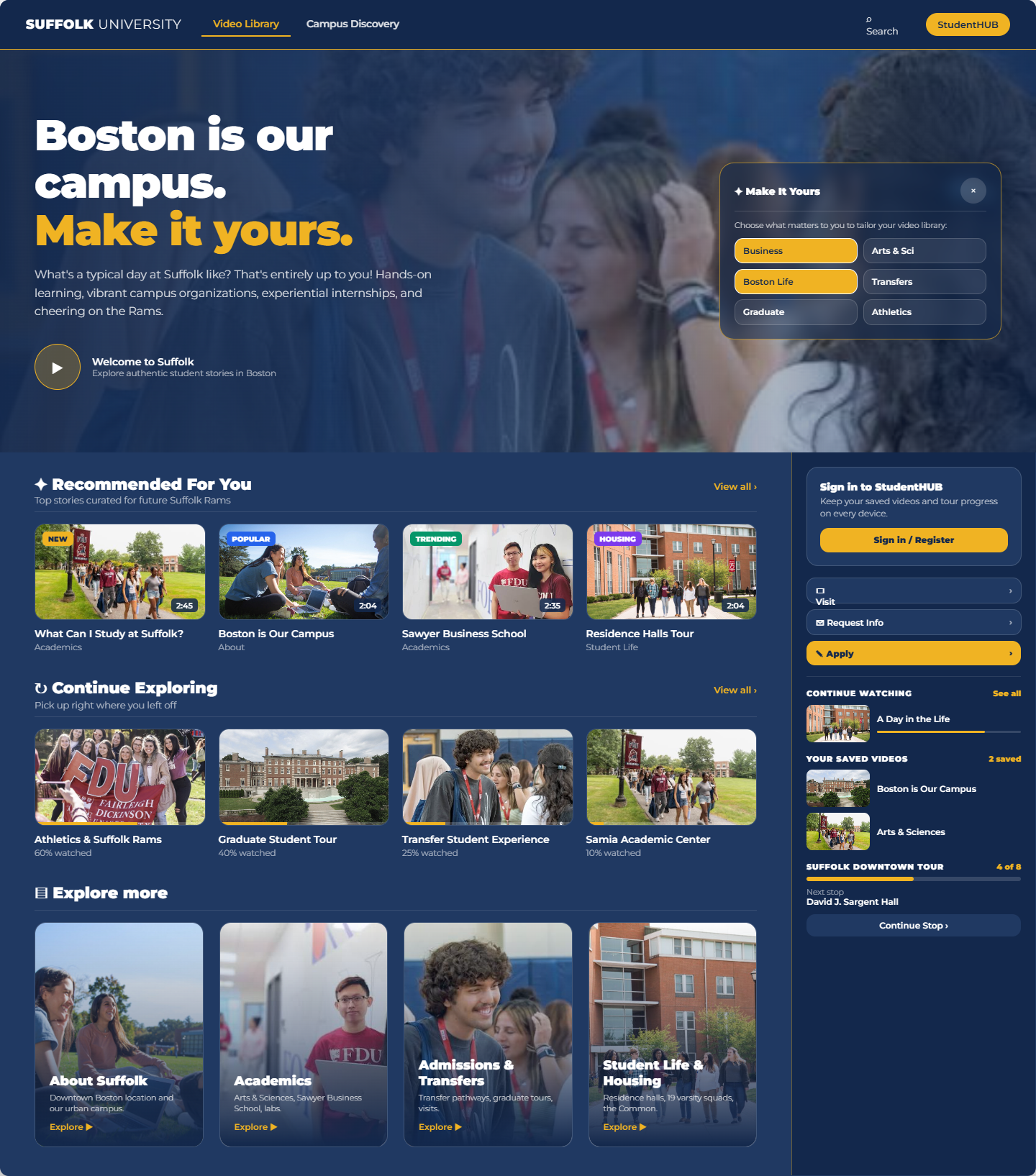
Full-bleed video hero with the Make It Yours glass card; StudentHUB as a right rail; Recommended, Continue Exploring and Explore more as 4-up rows. This is the Suffolk layout as built.
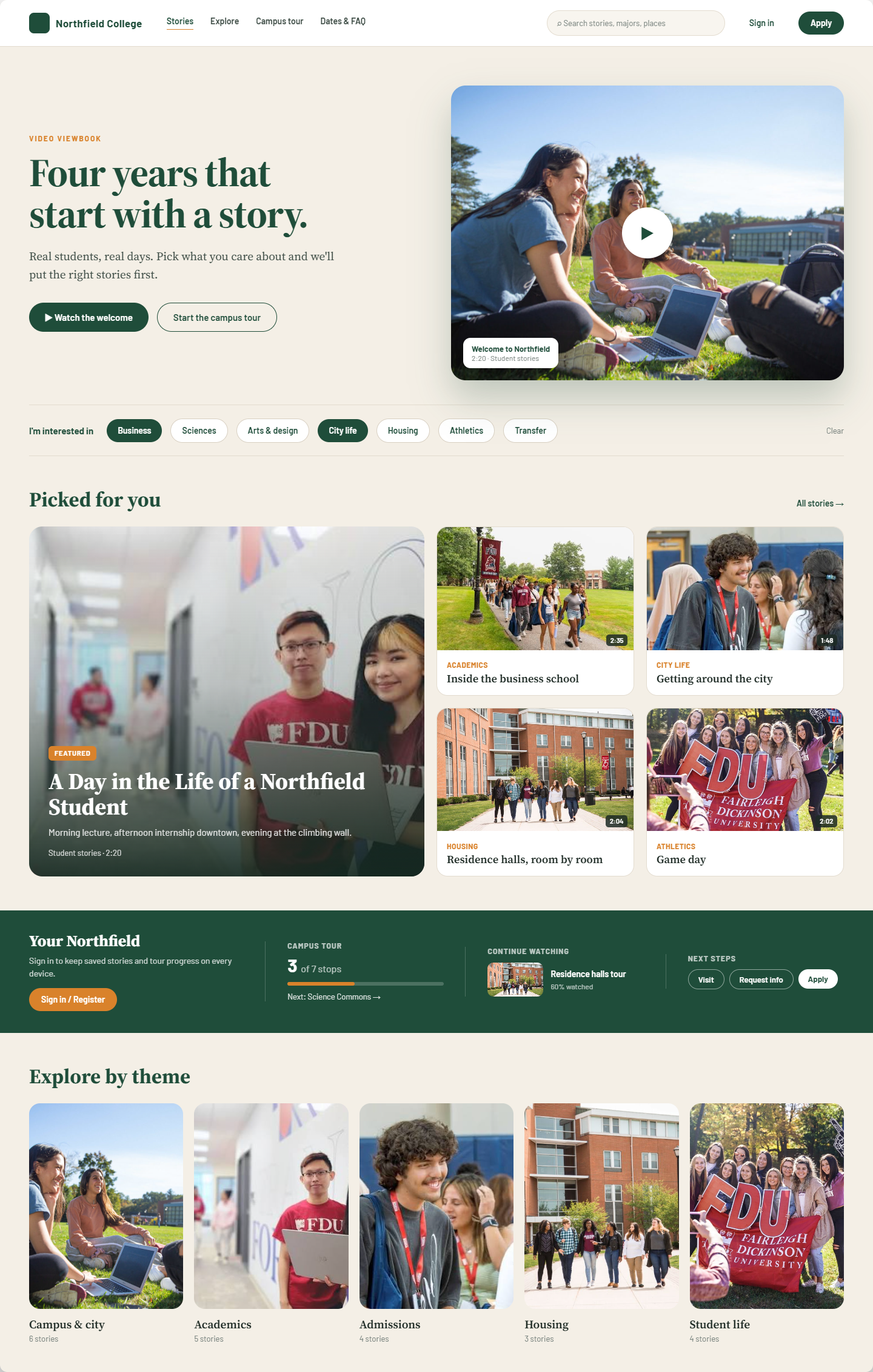
Split hero (headline left, poster right); interest chips inline under the hero; Recommended as a mosaic with one featured story; StudentHUB as a full-width band; categories as a poster row.
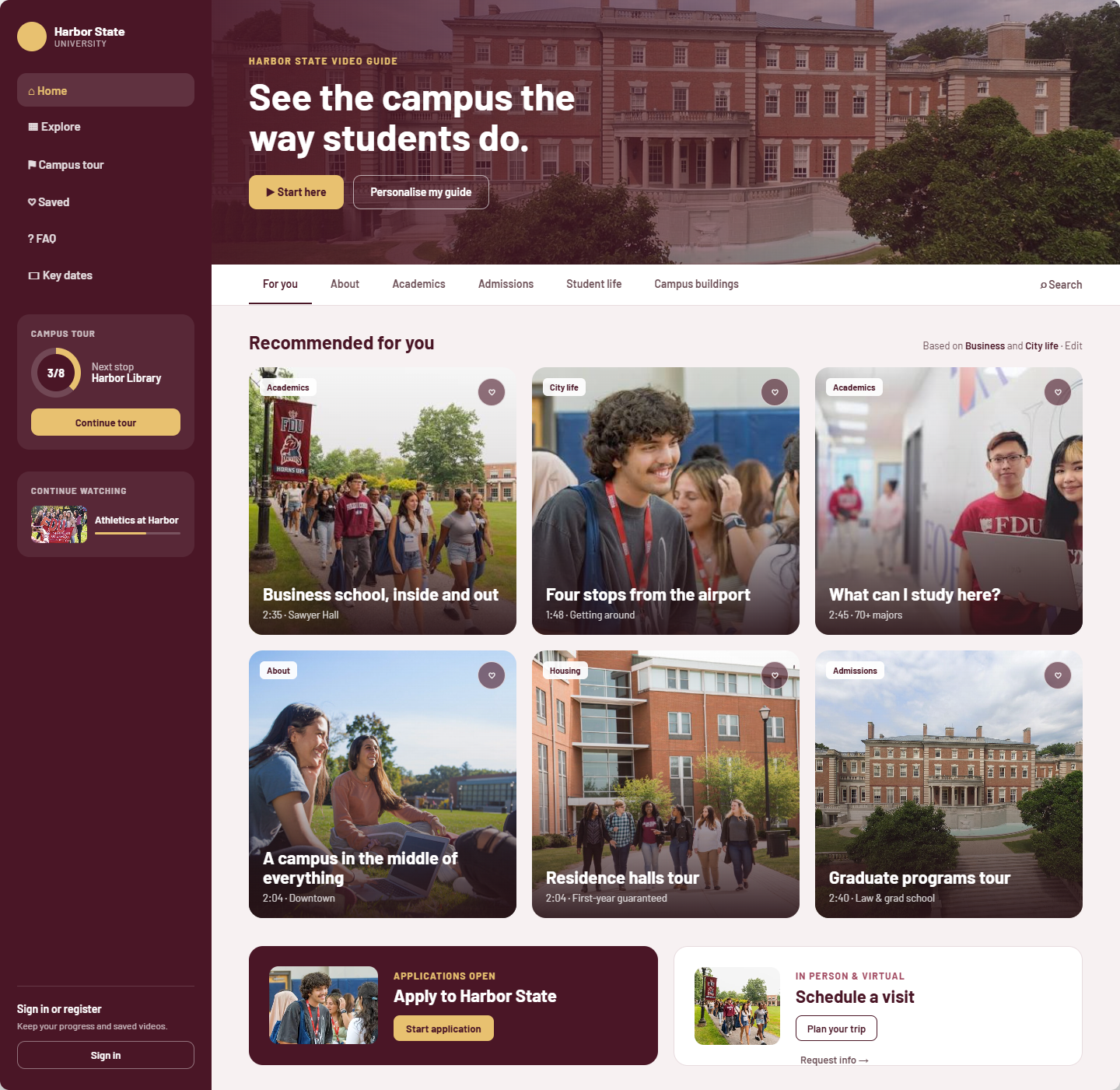
Left sidebar carries navigation, tour progress ring, continue watching and sign-in (the sidebar is the StudentHUB); compact hero band; category tab bar; 3-up square tiles; paired CTA cards.
18. Appendix C: campus map mock-ups
The /campus page in each template, using Suffolk's map image and the same 14 places, 5 categories and 7-stop curated tour from tenants/suffolk.json. Stop 1 is visited, stop 2 is selected. Interactive source: reference/template_variations.dc.html (2a, 2b, 2c). Behaviour is specified in section 8.13.
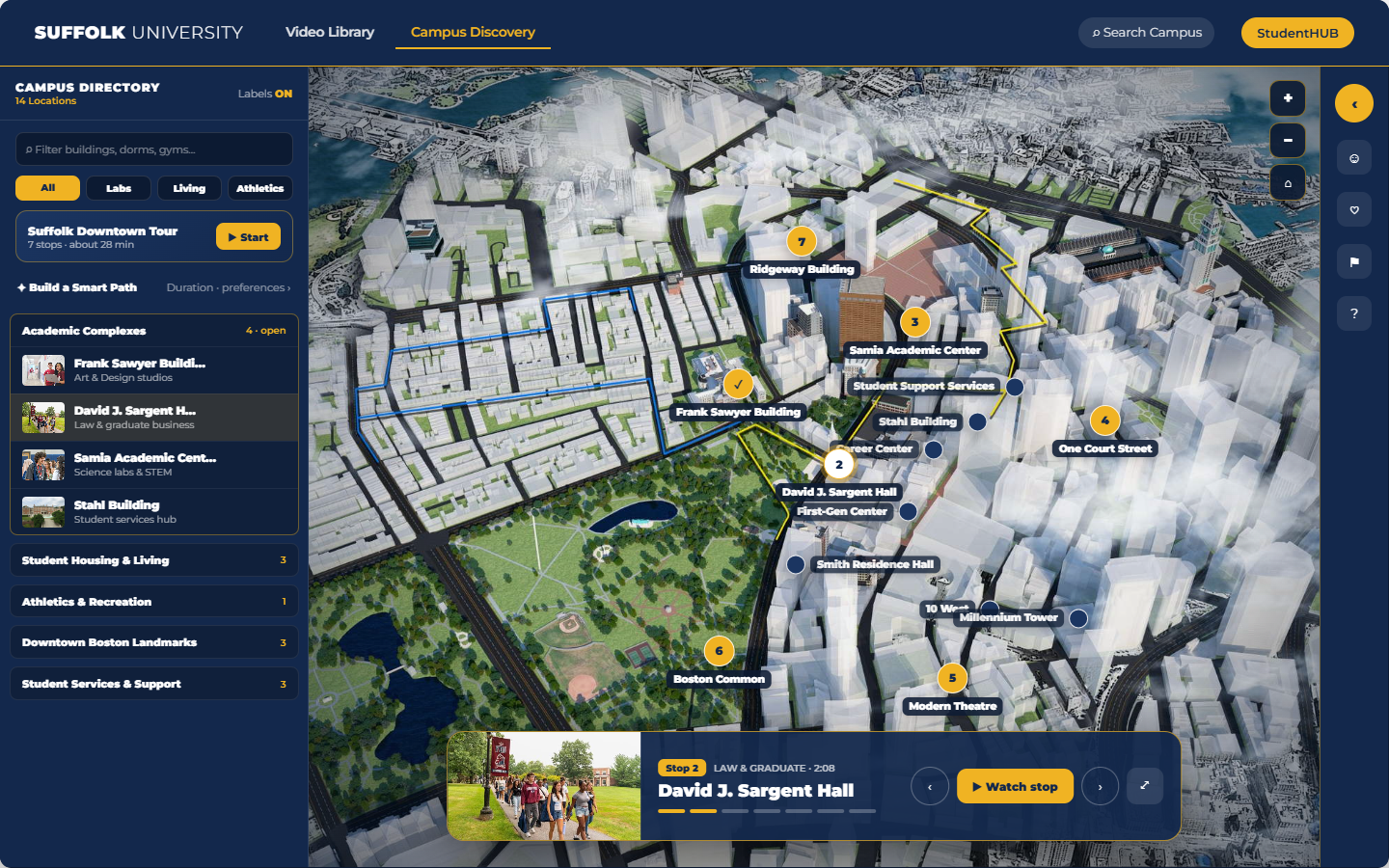
Full-viewport map; directory drawer on the left with search, filter pills, curated tour card, Smart Path and accordion list; tour dock bottom-centre with stop thumbnail, progress segments and prev/next; StudentHUB docked to a 72px strip on the right.
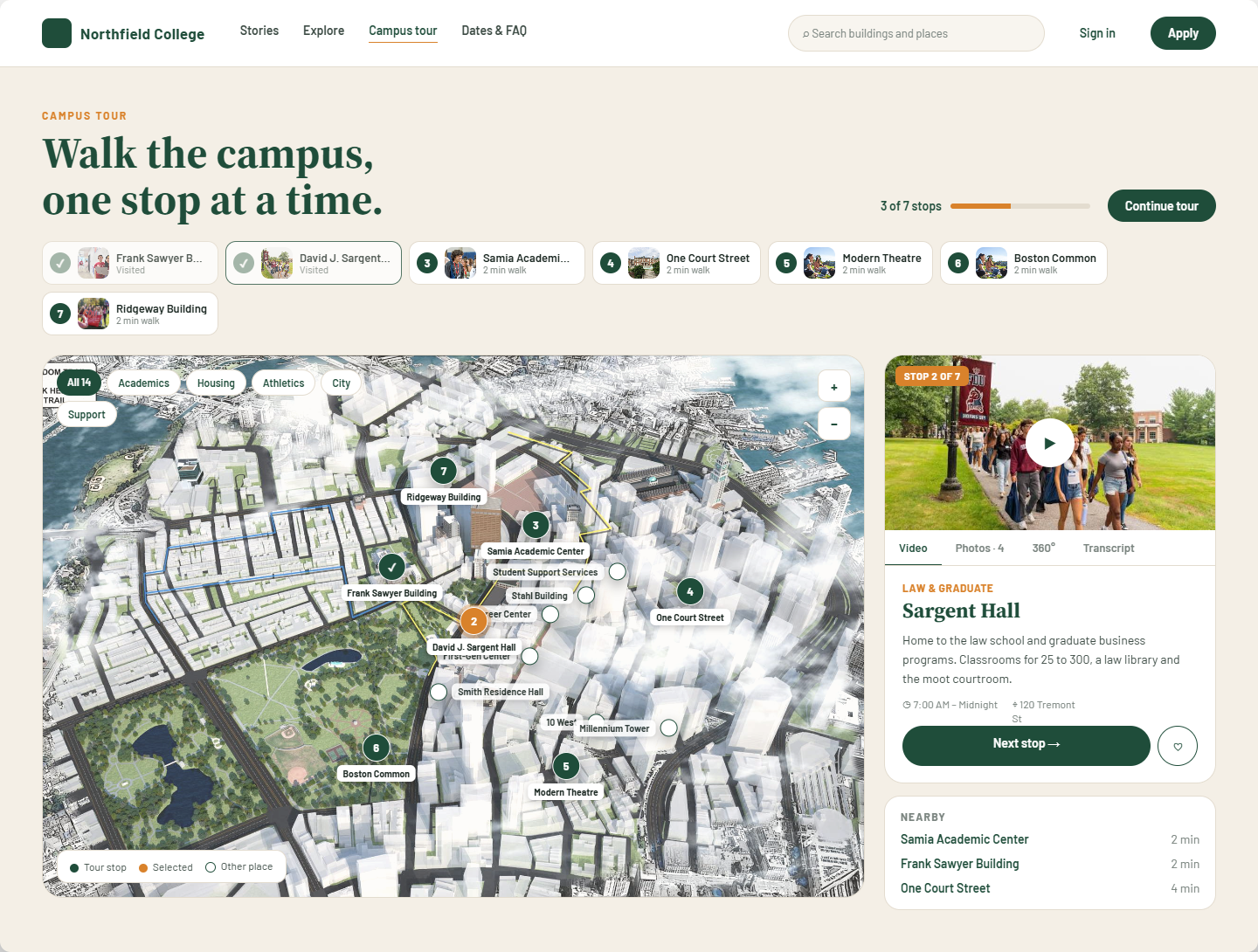
Headline and tour progress; the seven stops as a numbered strip; framed map panel with filter pills and legend; selected place as a side card with Video · Photos · 360° · Transcript tabs and a Nearby list.
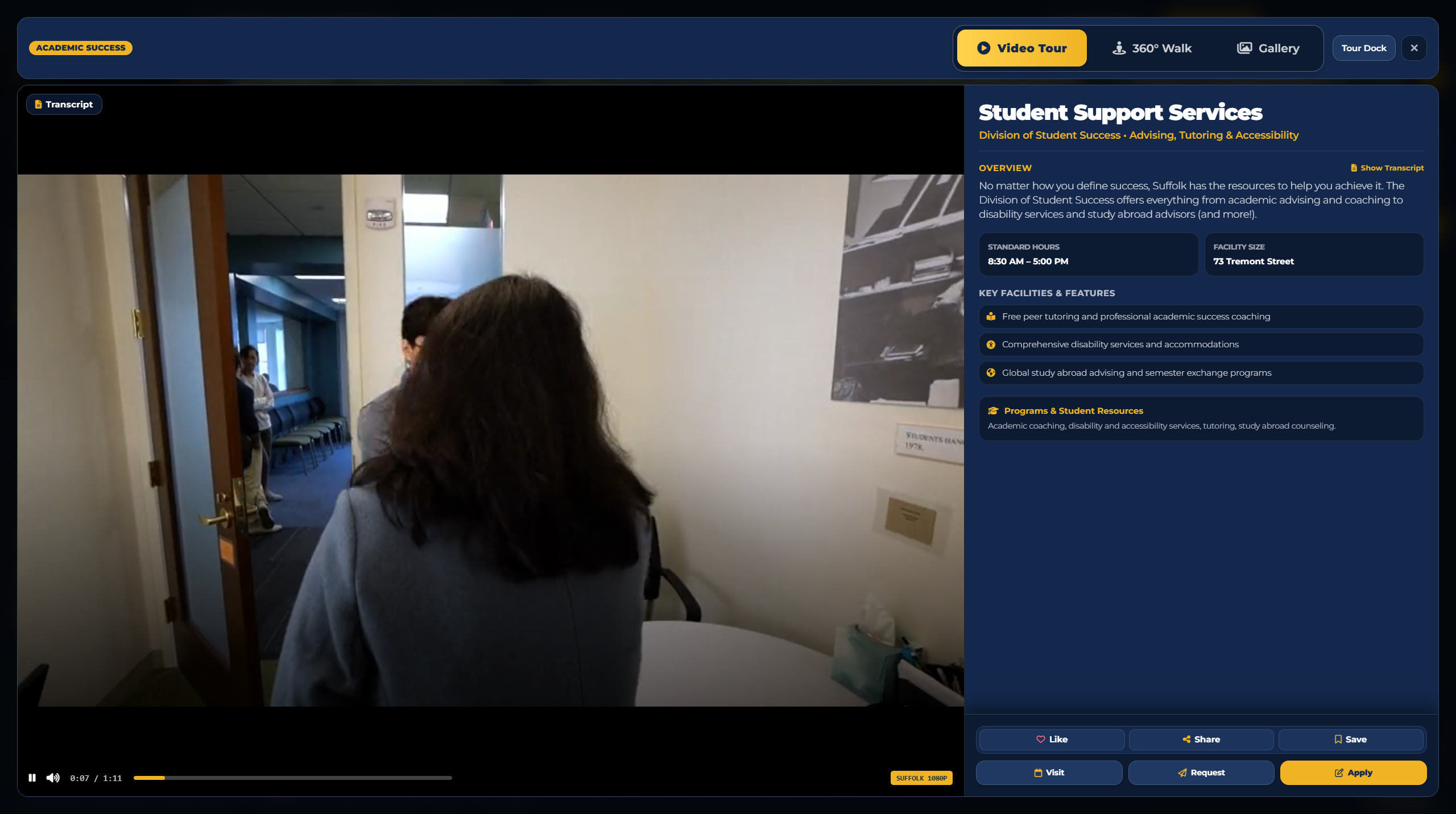
The reference for the pin reveal in every template (section 8.13): category badge and media switcher (Video Tour · 360° Walk · Gallery) in the top bar; 16:9 player with transcript toggle on the left; title, overview, fact tiles, key features, programs card and the Like · Share · Save / Visit · Request · Apply footer on the right. The admin tool's place editor produces this view from the fields it collects.
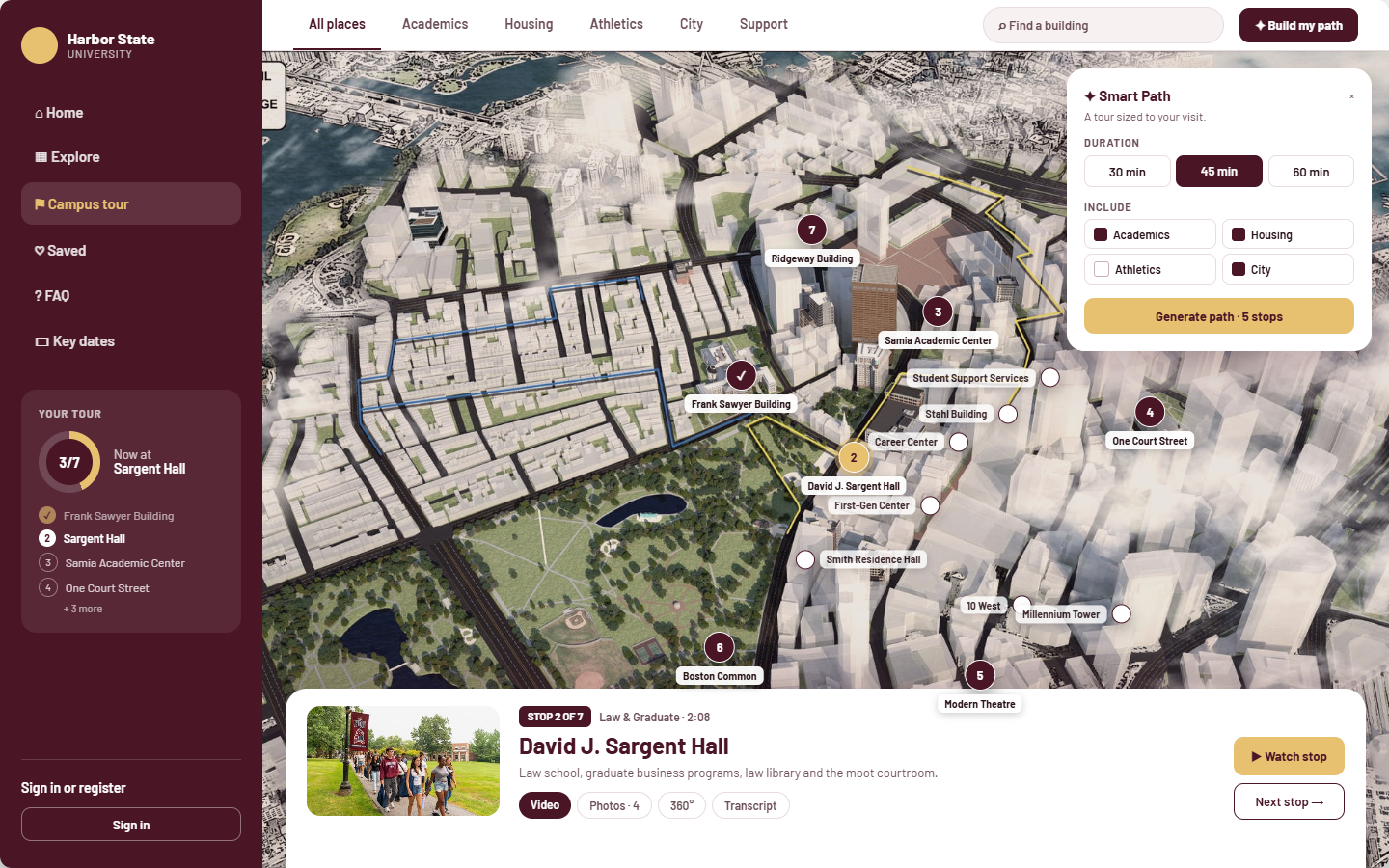
Sidebar persists and lists the active tour; category tab bar with search and "Build my path"; Smart Path builder floats top-right (duration, preferences, generate); selected place as a bottom sheet with media tabs and Next stop.
19. Appendix D: reference builds and prototypes
reference/suffolk_video_library.htmlreference/suffolk_campus_discovery.htmlreference/template_variations.dc.htmlreference/mobile_prototype.dc.htmltenants/suffolk.jsontenant.schema.jsontemplate, theme, cardStyle, map and customTheme.The HTML files are design references, not production code. The renderer is a new implementation that reproduces their behaviour from the tenant file.